Contents
The freshly uncovered band has no historyFrom an equal share to each pixel's ownA fixed total, with leftover rays going to the centre firstChange detection that casts the same ray againThe cost, and the work leftReferencesIn a first-person shooter, when you raise your weapon or swing it to the side, the gun that filled the lower right of the screen moves out of the way and uncovers the wall, the crates and sometimes an enemy behind it. It happens several times a second, so you usually don't even notice. In a game with ray tracing on, though, this freshly uncovered band is a little special. The rest of the screen has a result gathered bit by bit over the last few dozen frames, but this band has nothing gathered at all.
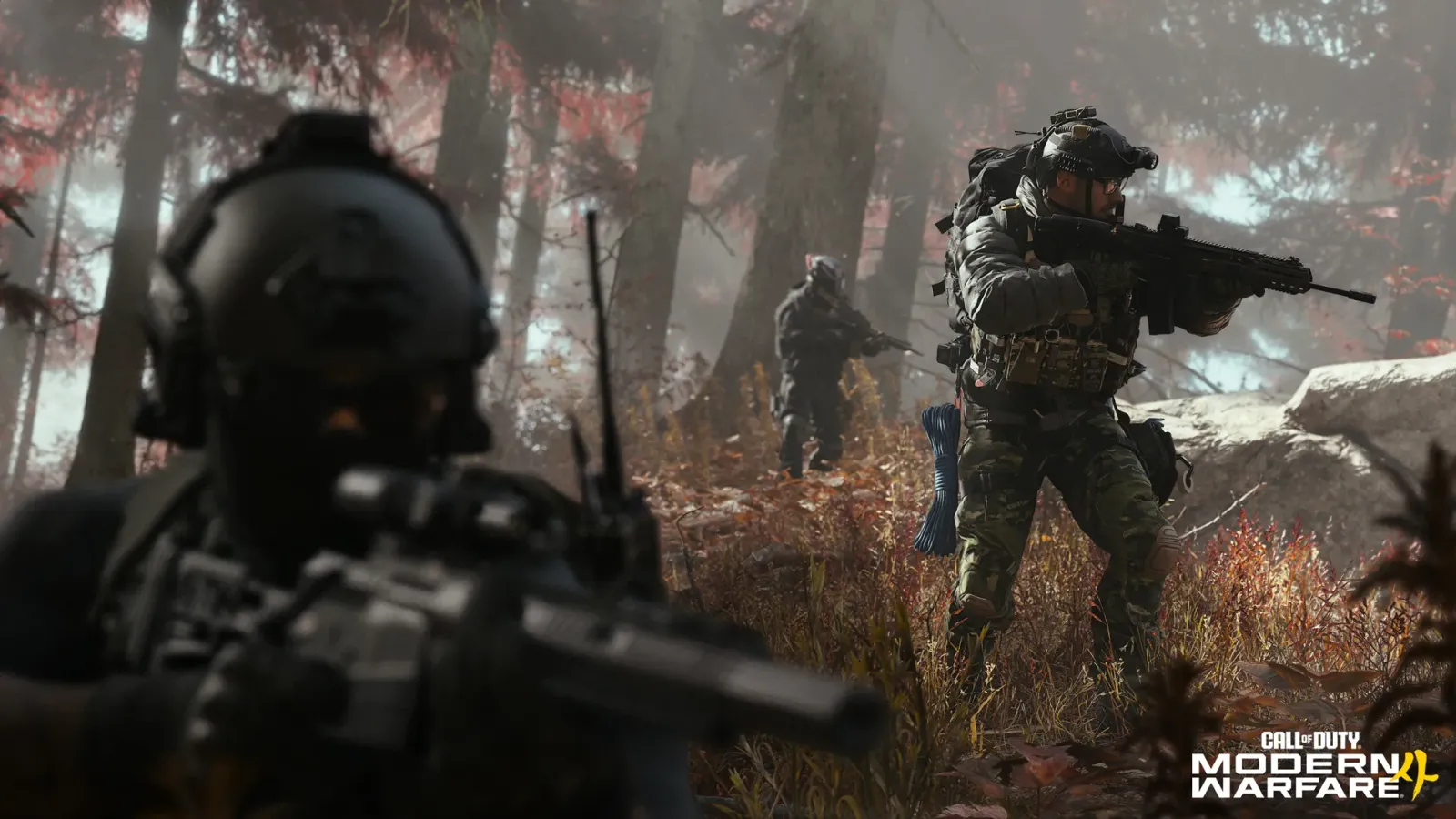
An official image from Call of Duty: Modern Warfare 4. The gun and the person at the front of the screen hide the scenery behind them. Image: Activision, official announcement.
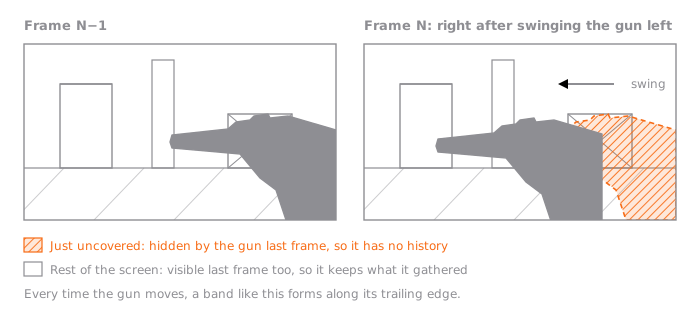
Michał Olejnik, who leads ray tracing on the Call of Duty series at Infinity Ward Poland, showed how they deal with this band in his talk Variable Rate Ray Tracing in Call of Duty: Modern Warfare 4 at the Advances in Real-Time Rendering course at SIGGRAPH in July 2026. The course abstract states the problem like this: traditional fixed-rate ray tracing with screen-space denoising proved insufficient: disocclusion artifacts and temporal lag are far too distracting during competitive play.
To answer the title first: the places Call of Duty draws harder are the areas just uncovered, and the centre of the screen. It keeps the total number of rays cast per frame the same, takes rays away from areas that have been stable for a while and gives them to areas just uncovered. Whatever is left over goes to the centre of the screen first. The talk calls this bundle VRRT (Variable Rate Ray Tracing). According to the talk, in the shipping version of Modern Warfare 4 it is used for ray-traced reflections and indirect lighting.
The freshly uncovered band has no history
Ray tracing casts an imaginary line, a ray, into the scene from the surface visible at each pixel on screen, sees what it hits and works out the light. For reflections the ray goes in the mirrored direction; for indirect lighting it goes in one direction picked from many over the surface. To get an accurate value you would cast in many directions per pixel and take the average. Games don't have time for that. The talk says that because rays are more expensive, we're usually limited to ~1spp – it's way more noisy.
A value decided from a single direction varies wildly from pixel to pixel. Even on the same grey wall, some pixels come out bright and some dark, so the screen looks as if it has been sprinkled with sand. This is ray tracing noise, and the stage that removes it is called a denoiser.
A denoiser has two main tools. One is time. Keep blending the result gathered up to the last frame with this frame's single ray, and since each frame casts in a different direction, the average gets more and more accurate. The denoiser in the talk also stores, per pixel, how many samples have been blended so far, and moves that record along when the camera moves. The other tool is space. Blending with neighbouring pixels to blur them reduces noise even within one frame, but because it mixes values from different places, detail gets smeared and the values become biased.
The time tool is the same machinery as the upscaler I covered in Why games don't render 4K at 4K. Reprojection, which follows earlier results along motion vectors to fetch them; history, the record built up that way; and disocclusion, the fact that a spot newly uncovered by something moving out of the way has no history, are all in that post. In my view, the only difference between the two is what they gather. An upscaler samples a different spot inside the pixel each frame and gathers resolution; a denoiser casts a ray in a different direction each frame and gathers the average of the light.
Let's call the number of samples piled up in a pixel its history length. The demo in the talk caps it at 64. If you cast one ray per frame, a just-uncovered pixel takes 64 frames to become as smooth as everywhere else.
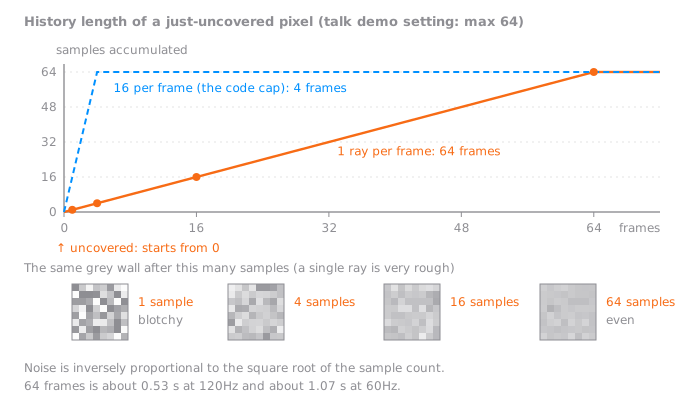
64 frames is about 0.53 seconds at 120Hz and about 1.07 seconds at 60Hz. The talk says Call of Duty targets a 120Hz performance mode and a 60Hz quality mode, and either way, the next movement comes before the spot from a single swing of the gun is smooth again.
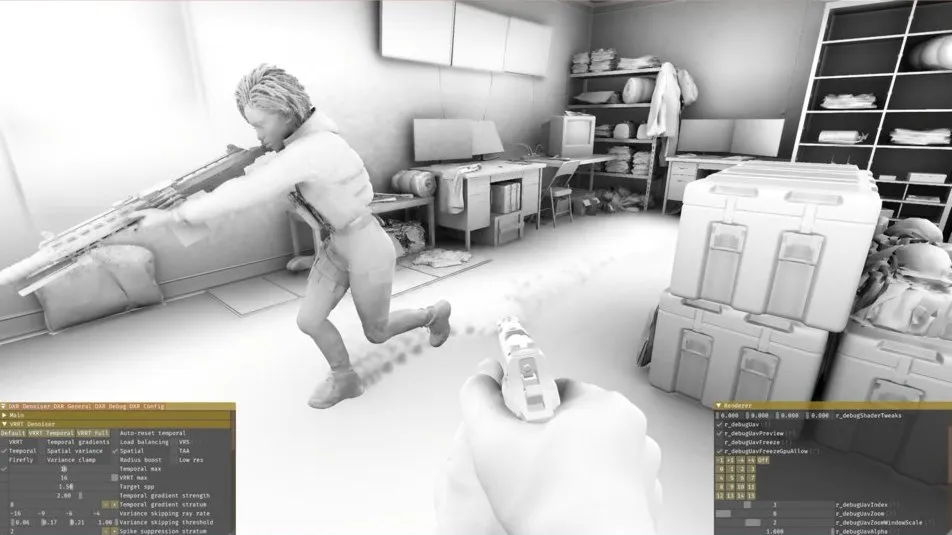
While history is short, all the denoiser can do is apply a strong spatial blur. Here things get one step more tangled. SVGF, now the industry standard, decides how hard to blur by looking at how much a pixel's value wobbles from frame to frame, that is, its variance. A sharp shadow edge that always gives the same value is left unblurred; only the penumbra, where the values wobble, gets blurred. But this variance is estimated from samples gathered over time, so where there is no history it can't be estimated. So only those spots get blurred hard, and the denoising strength differs from the area right next to them. The talk puts it as you can 'paint' the screen in artifacts by moving your character model around, and adds that it is especially obvious in first-person games like Call of Duty.
The sentence where the talk points at Call of Duty's particular situation is this: in Call of Duty most of the action is around your weapon that constantly dissoccludes environment and enemy players, which negatively impacts visual clarity and therefore gameplay. Most of the demo videos in the talk show only AO (ambient occlusion), the effect that darkens corners. Below is the image shown next to that sentence.
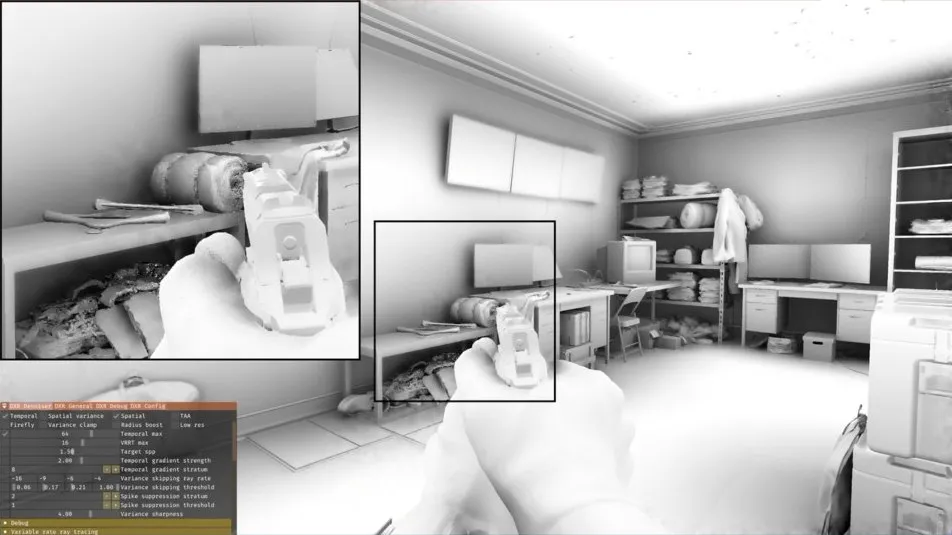
Temporal accumulation plus a spatial blur of radius 8. The slide calls this acceptable for a simple case like AO but still rough for a multiplayer game. Image: Michał Olejnik, Variable Rate Ray Tracing in Call of Duty: Modern Warfare 4 p17, © 2026 SIGGRAPH Advances in Real-Time Rendering in Games course.
Moving characters are the same. The typical example the talk picks is where characters and the environment occlude each other, especially near shoes. The author names AO lagging behind around shoes as one of my denoising pet peeves.
Sixteen frames accumulated with no rule for throwing history away (variance clamp off). The shading under the running character's feet stays on the floor as a smudged tail. Image: Michał Olejnik, Variable Rate Ray Tracing in Call of Duty: Modern Warfare 4 p29, © 2026 SIGGRAPH Advances in Real-Time Rendering in Games course.
Because this is a multiplayer game, the worry doesn't stop at image quality. Looking back on early experiments, the author writes that we had major concerns about impact of denoising artifacts on multi-player gameplay clarity and fairness. The reason seems simple to me. The spot where an enemy has just come round a corner is exactly a spot with zero history.
Machine learning denoisers can't sidestep this either. The talk grants that machine learning is good at judgements that are hard for people to tune, but says even it will be fundamentally limited by the fact that temporal history is empty or short. Then it turns the question around. Instead of hiding the lack of history well, what if you filled the history itself? You cast more rays there.
From an equal share to each pixel's own
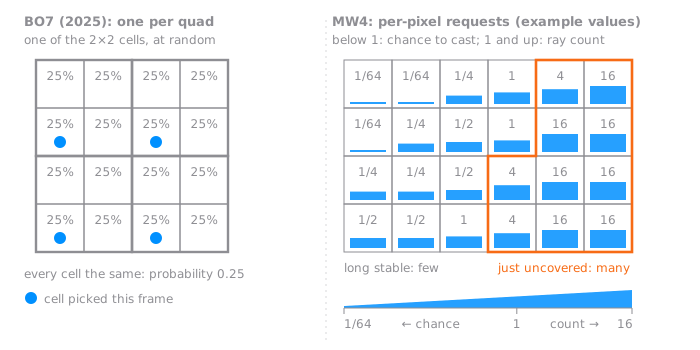
How many rays to cast and where has been a long-standing question at Call of Duty. 2025's Black Ops 7 added ray-traced reflections to the PC version and shipped the first basic form of VRRT with them. It casts fewer than one ray per pixel and fills the gaps over time. The main mode, quarter rate, divides the screen into 2×2 pixel groups (quads) and casts one ray per quad at one of the four cells, picked at random. In the talk's words, with each pixel having equal probability of casting ray. Seen from a single pixel, the chance of getting a ray in any frame is 0.25.
This approach is fair. The problem is that fairness. A sky where nothing has happened for 64 frames and a spot the gun has just moved away from both get the same quarter. The sky doesn't need that much, and the just-uncovered spot is far short with it.
The talk sorts VRRT into four pillars. Supersampling, which casts more than one ray where there is no history; undersampling, which casts fewer than one where things are stable; a load balancer that fits the two into a fixed budget; and change detection, which says when history should be thrown away.
First, supersampling. You need to know which pixels were just uncovered before you cast rays, so the denoiser's temporal stage is split in two. Reprojection, which follows the earlier result to fetch it, runs before the rays, and accumulation, which blends, moves after them. When the reprojection stage finds a pixel whose history broke, it decides right there how many rays that pixel will cast and passes it to the ray stage. Here is the line in the talk's code that makes this decision, shortened:
int requestedRayRate = disocclusion ? targetSampleCount : 1;If the pixel was just uncovered, it asks for enough to fill the history in one go; otherwise it asks for one. The talk adds that this is the simplest form and that you could ramp down more smoothly. The cap in the talk's code is 16. In the history graph above, the dashed blue line is the case of casting 16 at a time; for data that piles up to a maximum of 64, it fills in 4 frames. The talk says that even if the history isn't full, it still will be enough for good spatial filter and SVGF.
The other side is undersampling. A pixel with full history looks at how much its value wobbles and lowers its ray count below 1. A value below 1 is read as the probability of casting a ray this frame. A pixel that asked for 0.25 casts about once every four frames. Whether to cast is decided by a blue-noise texture laid over the screen. You lay a pattern with a threshold between 0 and 1 written in each pixel, and cast if the requested probability is above the threshold. Blue noise is a pattern where large and small values don't clump together but are spread evenly, so in an area that asked for the same probability, the pixels that cast are spread evenly too.
This makes last year's quarter rate no longer a special mode. As the talk says, our last year's quarter rate mode can be trivially achieved with probabilities of 0.25. The difference is that each pixel now sets its own share without knowing its neighbours. The range it can ask for runs from 1/64 at the bottom to 16 at the top. A pixel that casts once every 64 frames and a pixel that casts 16 in one frame can sit on the same screen. At the time of the talk (July 2026), the author described this undersampling as something we intend to ship in Modern Warfare 4.
A fixed total, with leftover rays going to the centre first
Let each pixel set its own share and one problem remains. The total swings with whatever happens on screen. In a frame where a big wall is uncovered all at once, the ray count explodes, and the frame time spikes with it. In the talk's video, too, turning on supersampling alone made the disocclusion artifacts disappear but went over budget. That's trouble for a game aiming at 120Hz.
So VRRT's budget is set by a single slider, average rays per pixel. The example the talk gives is 1.5. Whatever the pixels ask for, the total cast this frame is fitted to this value.
The talk calls the way it fits them a water-filling algorithm. First, each pixel's request is rounded into one of a few slots, buckets, and the pixels in each bucket are counted. If the total goes over budget, the highest bucket with any pixels in it drops one step as a whole, and this repeats until it fits the budget. If it falls short, the opposite happens, raising buckets from the lowest. As the talk emphasises in bold, the load balancer doesn't work on per-pixel ray requests, only determines thresholding on bucket level.
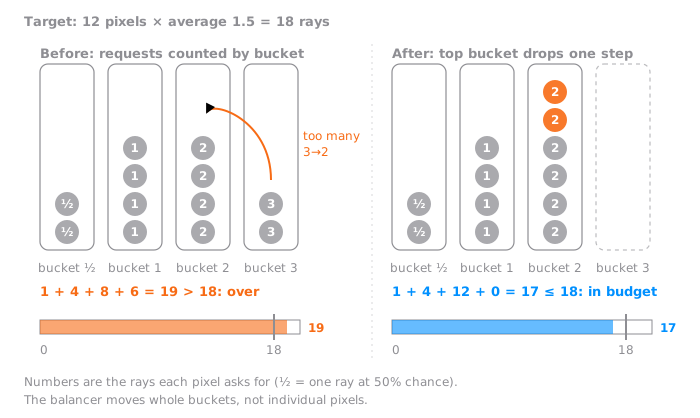
The figure redraws the example from the talk's slide. With 12 pixels, an average of 1.5 makes a budget of 18. Adding up all the requests gives 19, which is over, and moving the two pixels in the highest bucket, 3, down to bucket 2 brings it to 17, inside the budget.
Moving only whole buckets has a weakness. It's too coarse. Suppose the whole screen has settled, every pixel asks for one ray and the target is 1.5. There's budget left over, so a bucket should go up, but raising all of bucket 1 makes every pixel 2, an average of 2.0, which is over budget. There's no way to raise only half the bucket.
So the inside of a bucket is split again. The screen is divided into several layers of rings from the centre outwards, and the pixels in each bucket are also counted per ring. Then, within the bucket threshold, it can find one more threshold, a ring threshold, and raise only part of a bucket. In the example above, inner half of screen casts 2 rays, outer casts 1 ray. The average is exactly 1.5.
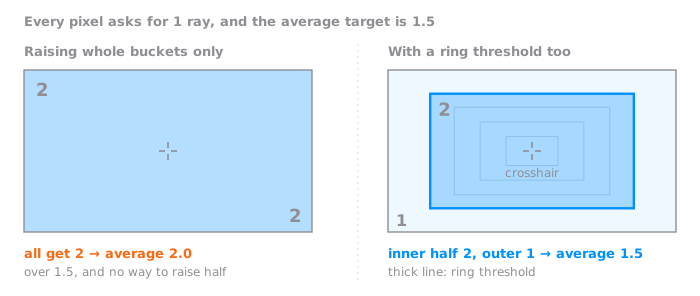
The rings are rectangles because that is easy to compute, so in the author's words they are not very round. Still, this gives the title's second answer. Leftover rays go to the centre first. The talk compares this to foveated rendering, which draws more precisely where the eye rests. We usually want better quality near the center, especially in an FPS. In a game where the crosshair always sits in the middle of the screen, it's a natural choice.
A fixed total also works the other way. When nothing is happening on screen, the balancer raises buckets from the lowest with the spare budget, so stable areas look better. That means requests undersampling lowered below 1 go back up when the budget is generous. Ray counts below 1 actually stay only when the budget is tight. As the talk sums it up, VRRT moved rays from stable areas to unstable, while maintaining ray budget.
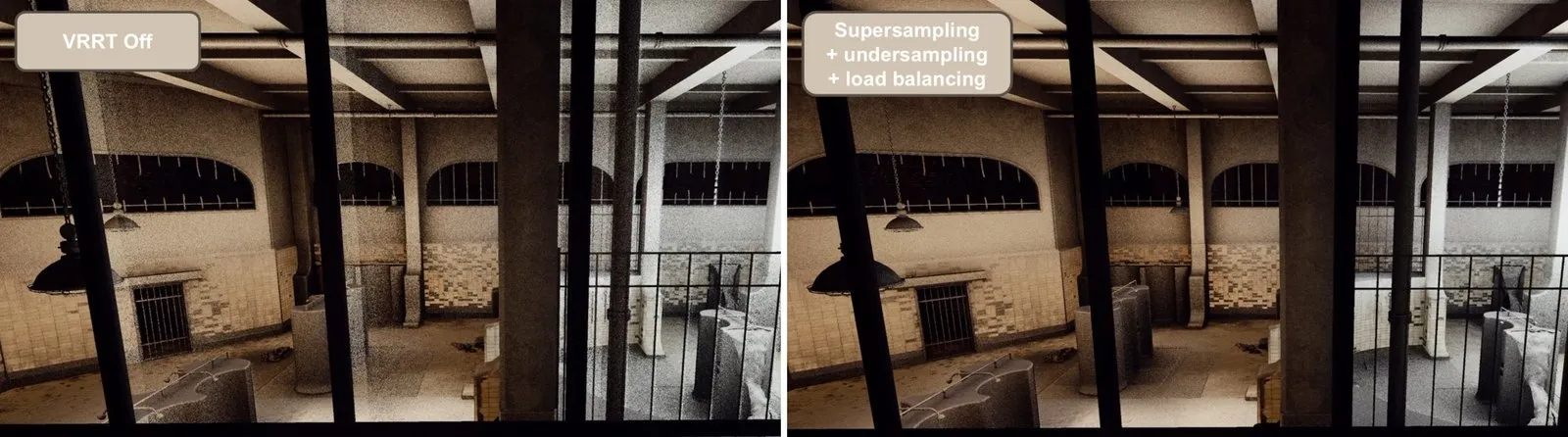
On the left is the image with VRRT off; on the right, supersampling, undersampling and load balancing are all on, filling the same spots while staying within the ray budget. Image: Michał Olejnik, Variable Rate Ray Tracing in Call of Duty: Modern Warfare 4 p51, p54, © 2026 SIGGRAPH Advances in Real-Time Rendering in Games course.
You can watch this redistribution yourself in the lab below. It is a model simplified for explanation, so it differs from the real code and numbers. On a 160×90 screen the camera stays put and only the gun moves sideways, and each ray is replaced by a single coin flip against a fixed AO value. Each pixel averages up to 64 samples into its history. The request rule is simple too: a pixel with zero history asks for 16, one still filling asks for 1, and one that is full and stable asks for anything from a half down to a sixteenth depending on how much it wobbles (these thresholds are the lab's own). Change detection and SVGF are left out. The rings are round instead of rectangular.
Left is VRRT off, right is on. While the ring is on, both cast the same number of rays this frame. What differs is which pixels the rays went to.
A rifle silhouette sweeps across a 160×90-pixel frame. Each pixel estimates its ambient occlusion with rays and keeps up to 64 samples of history. With VRRT off every pixel gets the same share (the average ray count), so the pixels the gun has just uncovered leave a rough trail built from one or two samples. With VRRT on, a freshly uncovered pixel asks for 16 rays, a pixel still filling its history for 1, and a pixel with full, stable history for less than one (1/2, 1/4…); a load balancer groups the requests into buckets (1/64…1/2, 1…16), demotes from the highest bucket or promotes from the lowest until the frame fits the budget, then a ring threshold bumps the pixels nearest the centre one bucket up to spend the budget exactly. While the ring is on, both modes cast the same number of rays per frame. Switch between the result, rays per pixel and history length, and change the average ray count (0.5 to 4) and the ring. A simplified model of the idea behind Infinity Ward's technique, not its code or numbers.
It opens on 'Side by side', with VRRT off on the left and on on the right, and the gun sweeps back and forth on its own. You can also drag the gun or move it with the arrow keys. While the ring threshold is on, both screens cast the same number of rays this frame. Try it in this order.
- First, switch the view to 'History length'. After the gun passes, the dark trail of short history stays long with VRRT off and short with it on. The bar under each panel shows how this frame's rays are split between 'just uncovered', 'filling' and 'stable' pixels, and the names of the colours are in the legend of the 'Result' view.
- Next, lower 'Average rays per pixel' to 0.5 and go back to the 'Result' view. At the default of 1.5, the difference in the result is subtle, just the blotches and smearing right behind the gun. With a tighter budget, the blotches in the trail on the off side spread wider.
- The 'Rays per pixel' view shows how many rays each pixel was given this frame (below 1, the share of frames it casts). With VRRT on, rays crowd into the spot just uncovered, and the leftover budget gives the round area in the centre one more than the outside. At an average of 1.5, even stable pixels get 1 to 2, and values below 1 show up when you lower the budget, to 0.5 for example.
- Finally, turn off 'Ring threshold'. Fitting by whole buckets only leaves no way to hand out the leftover budget, so at an average of 1.5 the lab uses only about 69% of it. The coarseness of buckets from earlier shows up as it is.
Change detection that casts the same ray again
Spots that were just uncovered are easy to find. The depth there was different last frame, so you compare. The hard case is when the spot is the same but the light has changed. When an object moves, a car drives past or a light changes, the history is still there, intact, but it's no longer right. If you can't throw such history away, you get temporal lag, where shading and reflections follow later than they should. The shoe example above is this case.
The industry's standard answer is variance-based colour clamping. It's the same idea as the neighbourhood clamp in the 4K post: look at the range of colours among the surrounding pixels now, and push the history into that range. The talk is fairly firm about this. It says this approach can over-clamp even a static signal, and that it isn't really detection that finds stale history in the first place but rectification that patches things a little every frame. The conclusion: industry standard variance-based color clamping is simply not good enough. It doesn't go with undersampling either. Where rays are cast at 1/64, there are hardly any fresh samples around to compare against.
Instead, VRRT's fourth pillar is the temporal gradient, a measure of change over time, which Christoph Schied, the author of SVGF, proposed in the follow-up paper Gradient Estimation for Real-Time Adaptive Temporal Filtering. You divide the screen into small tiles, pick one pixel per tile, and cast exactly the same ray as last frame again. Cast from the same spot, with the same random number, in the same direction, a different result means the light there has really changed, not that it's noise. Gather these differences into a small texture and blur them out, and you get a map that roughly shows which parts of the screen have changing light. Using that map, you cut the history short at those spots.
Modern Warfare 4 casts these rays in a separate small pass, one per 8×8 pixels, before the main rays. Because it runs first, its result goes into the reprojection stage alongside the disocclusion information, and spots where the light changed get more rays just like spots just uncovered. Supersampling makes up for the coarseness of the map. The summary in the talk's video is short: No variance clamping, yet no ghosting.
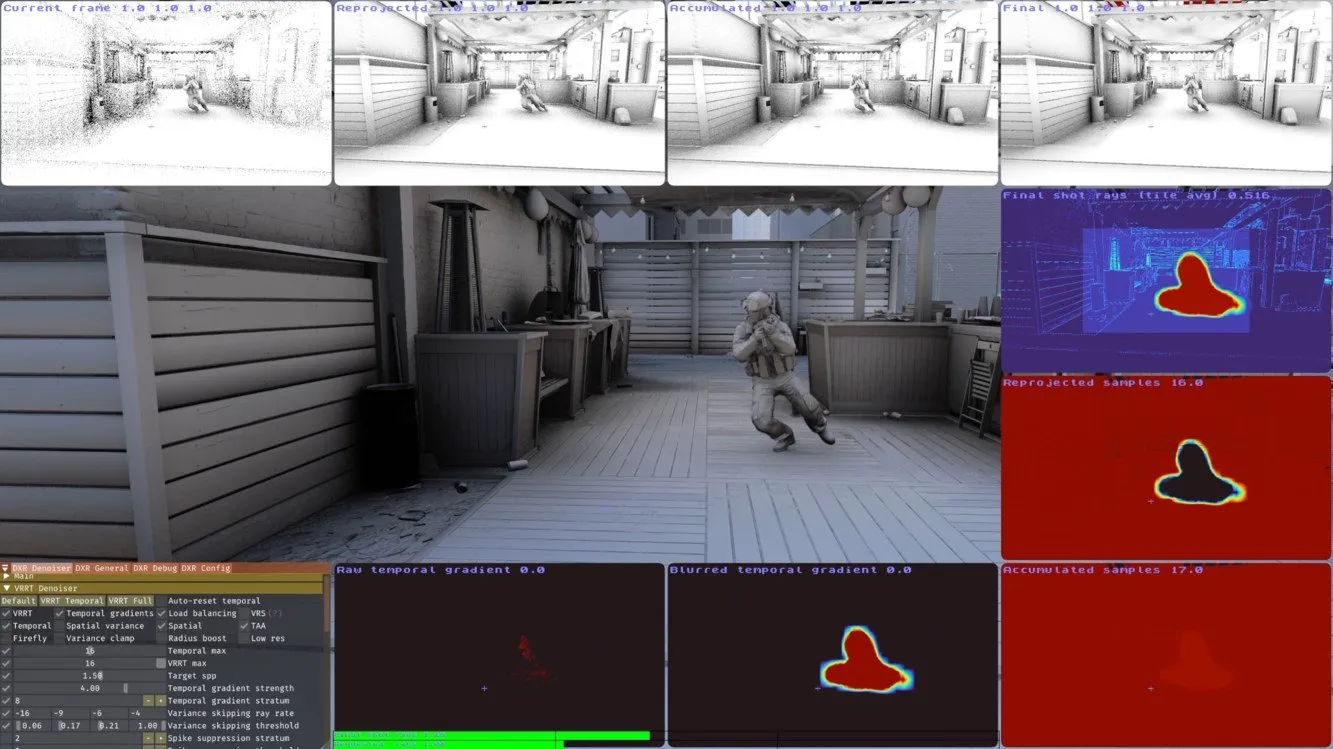
When change detection catches where the soldier moved (second panel at the bottom), the history there is cleared (middle right), rays are crowded there (top right), and after they are cast the history fills again (bottom right). Image: Michał Olejnik, Variable Rate Ray Tracing in Call of Duty: Modern Warfare 4 p59, © 2026 SIGGRAPH Advances in Real-Time Rendering in Games course.
The cost, and the work left
What does all this cost? The last table in the talk gives the time per pass when denoising AO at 1080p on an RTX 5090.
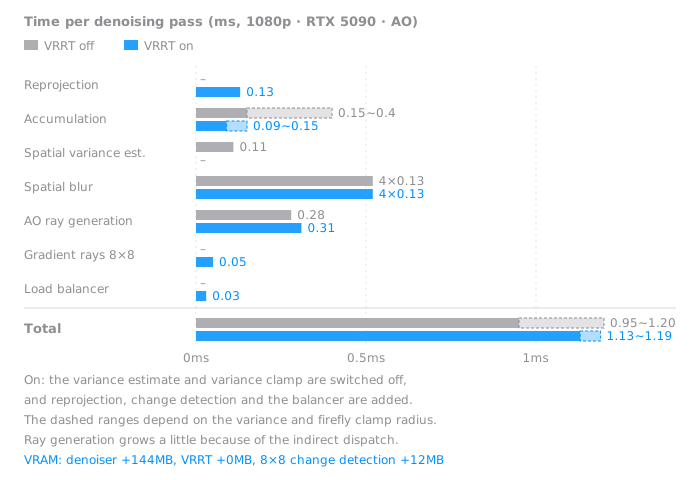
The totals are 0.95–1.20ms off and 1.13–1.19ms on. The new passes are all small, and dropping the variance estimate and variance clamp offsets part of them. For memory, the denoiser itself uses 144MB, but VRRT adds 0MB and the change-detection texture 12MB. The talk says this fixed overhead can be recovered by lowering ray budget 5-10%. That said, this table is for AO, and the talk has no console numbers.
The achievement the author rates highest is not the average but the worst case: we significantly raised the bar of the worst-case scenario for denoising.
There is also a caution about using an average ray count below 1. For a few frames right after the camera cuts to a new shot, there are black pixels that have never received a ray, so they have to be filled with spatial blur.
The talk lists the work that remains as well. Even in the change-detection demo, rays run short when an NPC comes close. It still stays above one per pixel.
As I see it, what will last from this talk is less any single technique than the way it changed the question. Instead of asking how many rays to cast as a quality option, it asked where to spend a fixed number of rays as a budget problem. Just as the upscaler didn't draw every pixel but gathered them over time, VRRT doesn't share rays out evenly but moves them to where they're short. Every time a player swings the gun, the engine is carrying rays over to the band uncovered behind it.
References
Talk
Original sources for the techniques
- Christoph Schied et al., Spatiotemporal Variance-Guided Filtering (SVGF), HPG 2017
- Christoph Schied, Christoph Peters, Carsten Dachsbacher, Gradient Estimation for Real-Time Adaptive Temporal Filtering (A-SVGF), 2018
- Eric Heitz, Laurent Belcour et al., a screen-space blue-noise sampler, SIGGRAPH 2019 Talk
- Michał Drobot, Software-based Variable Rate Shading in Call of Duty: Modern Warfare (2020)
- Michał Olejnik, Paweł Kozlowski, Raytraced Shadows in Call of Duty: Modern Warfare (2020)
The game and articles
- Call of Duty: Modern Warfare 4 announcement, official Call of Duty blog (28 May 2026)
- Digital Foundry, Call of Duty: Modern Warfare 4 - The Big Infinity Ward Engine Deep Dive (21 Oct 2026)
- ComputerBase, Call of Duty: Modern Warfare 4 im Benchmark-Test (German, 19 Oct 2026)
- raytracedb, Modern Warfare 4 Ray Tracing Tested (23 Oct 2026)
On this blog