Contents
Why multiplying by dt still changes the resultThe accumulator: collect time, scoop it out in equal piecesBacked-up time and leftover timeThe spiral of death, where catching up puts you further behind, and the time limitInterpolating with the leftover timeIn the enginesSeparating simulation time from screen timeReferencesA game character's jump usually starts with two lines like these. Every frame, reduce the velocity by gravity, then move the position by that velocity. Both are multiplied by dt, the time the frame took, so it seems they should move the same way at any frame rate.
velocity -= GRAVITY * dt;
y += velocity * dt;
But take this code as it is for a jump that leaves the ground at 8 m/s under 20 m/s² of gravity, run it at 30 fps, 60 fps and 144 fps, and the peaks come out at 1.47 m, 1.53 m and 1.57 m. On the same map, the same ledge can be cleared by one player and not by another.
A fixed-timestep loop as a water machine: each render frame a tap pours the real time that passed into a head box, and anything above 0.25 s spills over its weir into a drain pail (the frame-time clamp). The head box empties into a sectioned tank, the accumulator, with a scale in dt on its wall. While the tank holds at least one dt, a bucket that holds exactly dt scoops it out and dumps it into a counter tower, whose ratchet wheel clicks one tooth: one physics update. What is left below one dt stays in the tank; leftover divided by dt, alpha, shows on a dial, and a rider on a mast shows the jump height drawn between the last two steps, blended by alpha. At 30 fps it scoops twice a frame, at 60 fps once, at 144 fps mostly not at all.
Here is the standard fix for this problem, the fixed-timestep loop, in short: collect the real time that passed in a tank, and only ever scoop it out in pieces of the same size (dt), running physics once per piece. Whatever is too small to scoop carries over to the next frame, and the screen draws a blend of the previous state and the current one, weighted by that leftover. The picture above turns this process into a water tank. The water the tap pours each frame is the real time that passed, the tank's water level is the accumulator, and one bucket is one physics update. Each time the bucket is emptied, the ratchet wheel turns one tooth, and the share of water left at the bottom shows on the alpha dial on the right. A real frame lasts a few milliseconds, so it plays very slowly.
The basic structure follows Glenn Fiedler's 2004 article Fix Your Timestep! and the Game Loop chapter of Robert Nystrom's Game Programming Patterns. All the demos and figures in this post come from the same small simulation (an 8 m/s jump, 20 m/s² of gravity, a physics step of 1/60 s). The code in this post is simplified for explanation.
Why multiplying by dt still changes the result
Those two lines are numerical integration. In reality the velocity drops a little at every instant, but the code treats it as constant for the whole frame and moves the position in one go. This kind of approximation, cutting time into slices and adding them up, drifts further from the right answer the bigger the slice, that is, the bigger dt is. The exact peak is this.
Updating the velocity first and then moving the position with the new velocity, as the code above does (semi-implicit Euler), rises slightly too little each frame, so the coarser the frames, the lower the jump. Write the two lines the other way round and the jump gets higher instead. Either way, the result is tied to dt.
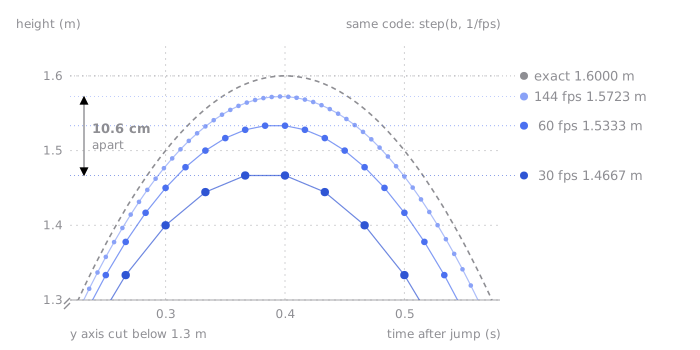
The same code reaches a different peak at each frame rate. One dot is one frame.
The demo below runs the same code side by side at the three frame rates. The faint dots beside each character are the frames it was drawn in. Switch the Loop toggle at the top from Frame dt to Fixed timestep and all three characters jump 1.53 m. What matters is not that they reach the right answer of 1.6 m, but that all three now share the same error.
Frame dt: each character integrates once per frame with its own frame time as dt (33.3 ms at 30 fps, 6.9 ms at 144 fps). The coarser the frames, the lower the peak.
Three identical characters jump side by side at 30, 60 and 144 fps. A ruler in metres runs up the left, a dashed line marks the exact peak of 1.6 m and a solid line marks the peak each character actually reached. The small dots beside each character are the moments it was drawn, sparsest at 30 fps. Integrating with the frame dt splits the peaks into 1.47, 1.53 and 1.57 m; switching to a fixed timestep makes all three 1.53 m. There are buttons to jump again and to pause.
Jump height is just the problem you can see. Frame times actually wobble a little every frame, so even on the same computer with the same input the result differs slightly every run. Replays that store only the inputs and play them back, or network sync where players exchange only inputs and each runs the simulation, are hard to build on a loop like this. Unless you also record dt for every frame, the same result will not come out again, and across computers dt differs, so even recording it cannot make them agree.
The accumulator: collect time, scoop it out in equal pieces
The easiest fix is to hard-code dt as a constant. However much time actually passed, call update(1 / 60) every frame. Now the result is identical on every computer.
The price is that game time gets tied to the display refresh rate. On a computer that only manages 30 fps, the update runs only 30 times a second and the whole game slows to half speed; on a 144 fps monitor it runs 2.4 times too fast. On consoles and older machines with a fixed refresh rate this was good enough, but on PCs and phones, where specs and refresh rates vary, it does not work.
So what we want is both at once. Physics always runs with the same dt, and game time keeps up with real time.
The way to satisfy both is the accumulator. Every frame, add the real time that passed to a single variable, and as long as it holds at least dt, run physics for dt and subtract dt.
let acc = 0;
let last = performance.now() / 1000;

function tick() {
  const now = performance.now() / 1000;
  acc += now - last;
  last = now;

  while (acc >= DT) {
    update(DT);
    acc -= DT;
  }

  render();
  requestAnimationFrame(tick);
}
With a physics step of 1/60 s, a 30 fps computer runs two updates per frame and a 60 fps one runs one. At 144 fps most frames run none at all, and only the frames where the leftovers have piled up past dt run one.
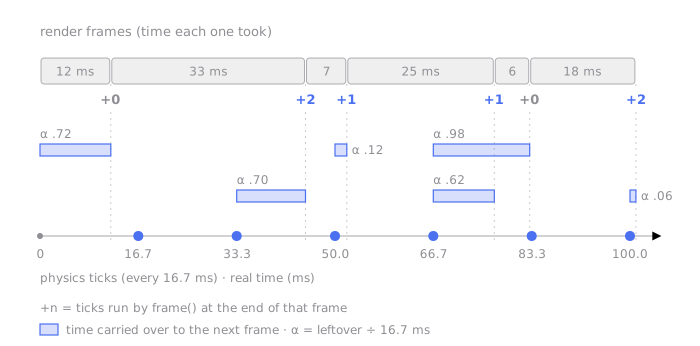
However uneven the frames are, the ticks stay 16.7 ms apart. The number of ticks per frame changes, and the time left over carries into the next frame.
Press the 30 fps, 60 fps and 144 fps buttons on the water tank at the top and you can see this difference as the number of buckets. In every case the bucket is the same size, and so the jump height is the same too.
Backed-up time and leftover time
The spiral of death, where catching up puts you further behind, and the time limit
The accumulator has one trap. What happens when computing a single physics step takes longer than dt? Running more updates to catch up on the lost time makes that frame take even longer, and the next frame falls even further behind.
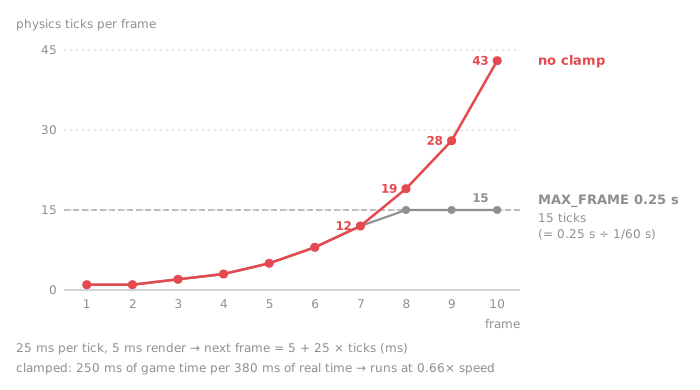
A calculation assuming each tick takes 25 ms. The harder it tries to catch up on ticks that cannot finish within 1/60 s, the more ticks pile up.
Fiedler first recommends leaving generous headroom for the physics, and failing that, putting a ceiling on the number of steps run in one frame. His final code does the same thing from the time side: it cuts any frame time over 0.25 s down to 0.25 s. With a physics step of 1/60 s, no single frame can run more than 15 updates. The price is that game time runs slower than real time for that moment. It slows down briefly rather than freezing.
The Inject a 0.5 s hitch button on the water tank pours in a single frame 0.5 s long. Water above 0.25 s spills over the weir into the drain pail, and the bucket moves only 15 times.
Interpolating with the leftover time
Once the accumulator loop has run, each frame leaves a scrap smaller than dt in acc. If you ignore that scrap and draw the last physics state as it is, objects move as if stepping up stairs whenever the physics and the display are out of rhythm. With physics at 20 Hz and a 144 Hz monitor, the same position is shown for about seven frames in a row and then jumps all at once. The Godot documentation describes this as jitter, a stair-step effect that comes from the timing difference between physics ticks and rendered frames.
Fiedler's last step puts that scrap to use. Divide the scrap by dt and you get a ratio between 0 and 1 that says how far along we are towards the next physics state.
Each time physics runs, keep the previous state prev, and when drawing, blend prev and the current state curr by alpha. In the demo below, set the Physics rate to 10 Hz and turn Interpolation Off and On. The dashed circles are the physics states prev and curr, and the filled ball is the position drawn on screen. With interpolation off the ball sticks to curr and jumps one step at a time; with it on, it glides between the two circles. The bars at the bottom are alpha for each frame.
Interpolation off: the ball is drawn at the latest physics state (curr). It stands still until the next physics step arrives, then jumps a whole step. The lower the physics rate, the worse the stutter.
A blue ball hops back and forth across the stage. The picture is drawn at the display rate, but the ball's physics only updates at the chosen rate (10, 20, 30 or 60 Hz). Two dashed circles are the previous (prev) and current (curr) physics states, small dots are earlier states, and the strip at the bottom shows alpha (leftover time ÷ dt) as one bar per frame. With interpolation off the ball sticks to curr and jumps a step at a time; with it on the ball is blended between prev and curr by alpha and glides.
It is not free. The interpolated position always lies between prev and curr, so the screen trails the physics by one tick. With a physics step of 1/60 s that is about 16.7 ms; at 20 Hz, as in the figure below, it is 50 ms. So the smooth blue line sits below and to the right of the stairs. Nystrom's chapter uses the same leftover in the opposite direction: extrapolation, drawing a little ahead using the current velocity. There is no delay that way, but in his words the extrapolation is a bit of a guess and sometimes ends up wrong. A ball about to hit a wall gets drawn inside the wall for one frame, for example. He adds that corrections like this usually go unnoticed.
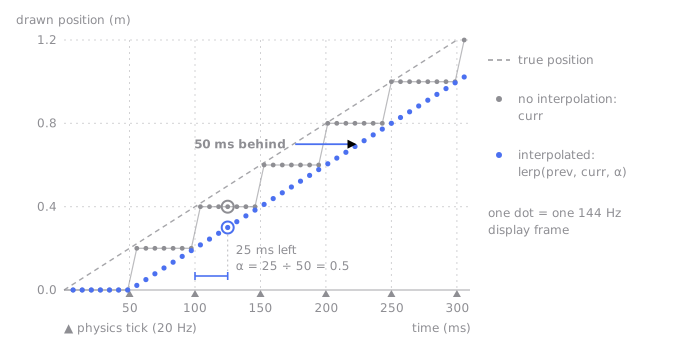
Physics at 20 Hz, display at 144 Hz. Interpolation removes the stairs, but the screen runs one tick (50 ms here) behind.
In the engines
If you use an engine, you will rarely write this loop yourself. Instead, the parts from this post show up as setting names.
| Part in this post | Unity | Godot |
|---|---|---|
Code that runs inside the fixed dt | FixedUpdate | _physics_process |
| Physics step | Fixed Timestep | Physics Ticks per Second (default 60) |
| Catch-up limit | Maximum Allowed Timestep (a time limit, default 0.333 s) | Max Physics Steps per Frame (a step-count limit, default 8) |
| Interpolating the leftover time | Rigidbody.interpolation (off by default) | Physics Interpolation (off by default; 2D in 4.3, 3D in 4.4) |
The Unity documentation leaves Rigidbody.interpolation off by default and advises, It is recommended to turn on interpolation for the main character but disable it for everything else.
The limits work a little differently. Unity cuts the time added in one frame, while Godot cuts the number of steps run in one frame. With the default of 8 and 60 ticks per second, the game starts slowing down once rendering drops below 7.5 fps.
The table also explains a common mistake. Moving a physics object directly in Update (once per frame) is the same as moving it outside the accumulator with a variable dt, which takes you back to the first problem in this post. Going the other way, reading input only in FixedUpdate can miss input from frames where physics did not run. It is safer to read input every frame and consume it in the physics step.
Separating simulation time from screen time
Here is the whole loop in one place. It has the same structure as Fiedler's final code.
const DT = 1 / 60;
const MAX_FRAME = 0.25;

let acc = 0;
let last = performance.now() / 1000;
let prev = initialState();
let curr = prev;

function tick() {
  const now = performance.now() / 1000;
  const frameTime = Math.min(now - last, MAX_FRAME); // guard against the spiral of death
  last = now;
  acc += frameTime;

  while (acc >= DT) {
    prev = curr;
    curr = step(curr, DT); // always the same size
    acc -= DT;
  }

  const alpha = acc / DT; // how far we are towards the next state
  render(lerp(prev, curr, alpha));
  requestAnimationFrame(tick);
}
A fixed-timestep loop separates simulation time from screen time. The simulation always walks at the same pace, so it gives the same result on any computer, and the screen fills in between its steps so things look smooth. That said, running with the same dt does not by itself guarantee exactly the same result. Determinism, which also means matching the order of floating-point operations and differences between platforms, is the next problem, and the fixed timestep is where it starts.
References
Original sources
Engine documentation